
27 lines
950 B
Markdown
27 lines
950 B
Markdown
# Spatialnavigation
|
|
|
|
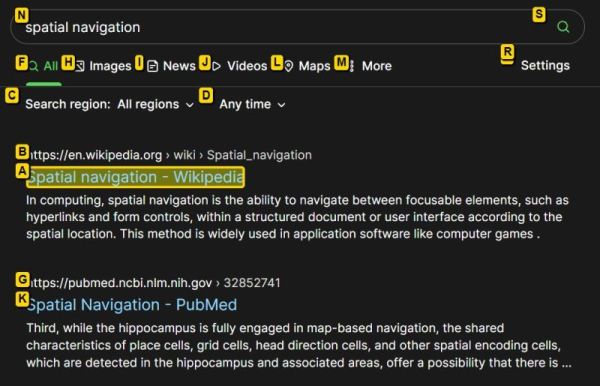
__Spatial Navigation Chrome Extension__
|
|
|
|
Smart spatial navigation with key map to links.
|
|
|
|
This is based off the *Spatial Navigation* extension by Falsandtru:\
|
|
https://github.com/falsandtru/spatial-navigation
|
|
|
|
Binds WASD, F, E and Q keys for navigation/hints.
|
|
|
|
* `W/A/S/D`: Four-way spatial navigation
|
|
* `E/Shift+E`: Expand/Contract (change link targets)
|
|
* `Q`: Quit navigation/hints mode
|
|
* `Enter/F`: Click link
|
|
* `Shift+Enter/Shift+F`: Shift-click link (open new focused tab)
|
|
* `Ctrl+Enter/Ctrl+F`: Ctrl-click link (open new background tab)
|
|
* `Ctrl+Shift+X`: Disable the hotkeys (for current tab)
|
|
|
|
Set your own keys: Click the icon and choose Options, or visit the details page in the browser extension manager.
|
|
|
|
### Screenshot
|
|
|
|
|
|
|
|
Any contributions are most welcome! 🤓👍
|